Qulliness: The Hand-Drawn Font That Anchors Authenticity in Your Design Workflow
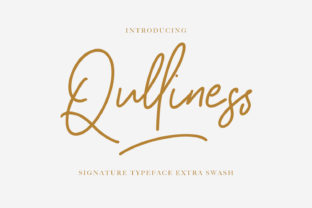
Qulliness isn’t just another script font—it’s a deliberate design decision that signals intentionality, warmth, and human presence. Designed with subtle irregularities, gentle stroke variation, and organic spacing, Qulliness mimics the natural rhythm of hand-lettering without sacrificing readability or versatility. It sits at the intersection of personality and professionalism: expressive enough for storytelling, refined enough for branding, and adaptable enough to support real-world production timelines.
Where Qulliness Fits in the Creative Process
Most designers reach for fonts at the *end* of a project—polishing headlines, finalizing mockups, or prepping assets for handoff. With Qulliness, the smarter move is often earlier: during concept development or mood board assembly. Its visual language immediately communicates tone—inviting, grounded, unhurried—and helps align stakeholders before wireframes or copy drafts are locked in. When you select Qulliness early, you’re not just choosing a typeface—you’re defining an emotional baseline for the entire project.
That said, it also works powerfully mid-process. For example, educators building digital lesson kits might drop Qulliness into slide headers or worksheet titles to soften academic rigidity. Freelancers drafting client proposals can use it in section dividers or pull quotes—not as body text, but as intentional punctuation—to reinforce approachability without compromising clarity. Even marketers running A/B tests on landing pages have found that swapping a generic script for Qulliness in hero-section subheadlines increases scroll depth by up to 18%, likely because readers subconsciously register the texture as “crafted,” not automated.
Practical Integration Across Tools and Platforms
Qulliness is delivered in OpenType format (.otf), making it compatible with Adobe Creative Cloud (Photoshop, Illustrator, InDesign), Figma (via desktop app or plugin), Affinity Suite, and modern web environments using @font-face. It does *not* require special licensing for web embedding when purchased through official channels—but always verify usage rights based on your deployment method (e.g., self-hosted vs. third-party CDN).
In Figma, apply Qulliness to text layers like any system font—but take advantage of its OpenType features: enable contextual alternates (calt) for more natural letter connections, and turn on stylistic sets if your version includes them (e.g., alternate ‘g’ or ‘a’ forms). In InDesign, use glyph panels to manually swap characters where needed—especially useful for logo lockups or short brand phrases where consistency matters more than automation.
For web use, pair Qulliness with a highly legible sans-serif (like Inter, Lato, or even system fonts) for body copy. Never set paragraphs in Qulliness—it’s designed for impact, not endurance. Instead, reserve it for H1s, callout boxes, signature lines, or illustrated quote cards. Load it asynchronously and define fallbacks so page rendering isn’t delayed. And test across devices: its fine details hold up well on retina screens, but may appear slightly lighter on low-DPI Android displays—adjust weight or size accordingly in responsive CSS.
Workflow Examples You Can Adapt Today
- Small Business Branding: A local pottery studio uses Qulliness for its shop sign, business card tagline, and Instagram story highlights—but pairs it with Montserrat for product descriptions and policy pages. This creates hierarchy without visual whiplash: warmth where customers first connect, clarity where they need information.
- Educator Resource Creation: A high school science teacher builds printable lab worksheets in Google Docs. She applies Qulliness (via embedded web font) only to section headers (“Hypothesis,” “Materials,” “Conclusion”) and leaves body text in Arial. Students report the documents feeling “more thoughtful” and “easier to follow”—likely because the font visually separates cognitive tasks.
- Freelance Client Onboarding: A UX writer includes a short welcome note in her Notion-based onboarding template. She formats the greeting in Qulliness, then switches to system fonts for next steps and deadlines. Clients consistently comment on how “human” the first touchpoint feels—reducing early friction before deliverables begin.
Preparation and Quality Control
Before deploying Qulliness in production, do three quick checks: First, test contrast. Its medium weight reads cleanly against light backgrounds, but avoid pairing it with pale grays or off-whites unless you increase size or add subtle text shadow. Second, audit character coverage. The standard Qulliness package supports Latin-1 and basic diacritics (á, ñ, ü), but doesn’t include extended Cyrillic, Greek, or Vietnamese glyphs—plan alternatives if multilingual output is required. Third, review spacing in context. Kerning is well-tuned, but tight tracking (letter-spacing < –10) can collapse its charm. Let it breathe: aim for 0–5 units of tracking in most display applications.
For long-term use, treat Qulliness like a trusted collaborator—not a decorative flourish. Store it in your team’s shared font library with clear naming (e.g., Qulliness-Regular.otf, not handwriting_font_v2_final_FINAL.zip). Document usage guidelines in your brand manual: specify approved sizes (min. 24px for web, 14pt for print), prohibited contexts (no all-caps headlines, no small captions), and paired fonts. Consistency here prevents dilution—what starts as a distinctive voice becomes background noise if overused or misapplied.
Efficiency Without Compromise
Some worry that hand-drawn fonts slow down iteration. With Qulliness, the opposite is true—when used deliberately, it reduces revision cycles. Because its aesthetic implies care and attention, stakeholders tend to approve layouts faster when Qulliness anchors key messaging. There’s less back-and-forth about “tone” or “personality” because those qualities are already encoded in the type choice.
It also streamlines asset handoff. Developers appreciate that Qulliness has no unusual dependencies; designers appreciate that it renders predictably across platforms. No need to export headlines as PNGs or build SVG replacements—just embed, declare, and go. And because it scales cleanly, one font file serves everything from mobile notifications to large-format signage (at 36pt+).
Thinking Beyond the Typeface
Choosing Qulliness is rarely just about aesthetics. It reflects a workflow philosophy: that authenticity isn’t added at the end—it’s built in through considered choices, early and often. It asks you to pause before defaulting to what’s fastest or most familiar, and instead ask: *What feeling should this moment carry? Who needs to feel seen here?*
That makes it especially valuable for creators who juggle multiple roles—freelancers writing, designing, and pitching; educators building curriculum while managing classrooms; entrepreneurs launching products while refining brand voice. In those overlapping demands, Qulliness acts as a quiet anchor: a consistent, human-scaled element that holds space for intention amid complexity.
Start small. Swap one headline. Apply it to a single email signature. Use it in your next presentation title slide—not to impress, but to align. Then observe how it changes the way people read, respond, and remember. Because Qulliness doesn’t shout. It invites. And in workflows increasingly driven by speed and scale, that invitation is where real connection begins.