Lifogia: A Thoughtful Script Font for Modern Design Work
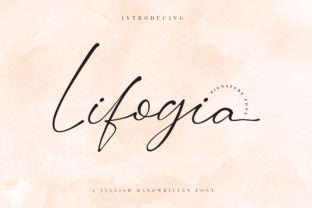
Lifogia is a script font designed with intention—not just ornamentation. It’s not built for maximal flair or theatrical flourish, but for clarity, rhythm, and quiet confidence in contexts where personality matters without sacrificing professionalism. If you’ve spent time sorting through hundreds of script fonts only to find most either overwhelm the message or feel too fragile for real-world application, Lifogia stands out by balancing expressiveness with restraint.
What Makes Lifogia Distinctive
At its core, Lifogia is a connected script—letters flow with natural entry and exit strokes—but it avoids the exaggerated loops and extreme contrast common in decorative scripts. Its stroke modulation is subtle: slightly thicker downstrokes, gently tapered terminals, and consistent spacing that supports readability even at smaller sizes. The “beautiful twist” referenced in its description isn’t a gimmick—it’s in the way certain characters (like the lowercase g, y, and z) carry a refined, slightly elongated tail that feels intentional rather than arbitrary.
The family includes one weight—regular—with full Latin support (A–Z, a–z, numerals, punctuation, and diacritics covering Western and Central European languages). It doesn’t offer bold or italic variants, nor does it include stylistic alternates or swashes. That’s a deliberate choice, not an omission: Lifogia prioritizes cohesion over customization. Its strength lies in how consistently it performs across settings—not in how many variations it offers.
Where Lifogia Delivers Practical Value
Lifogia works best when the goal is to signal warmth, approachability, or craftsmanship—without drifting into informality. Consider these realistic use cases:
- Branding for service-based small businesses: A local ceramic studio, wellness coach, or boutique letterpress shop might use Lifogia in a logo lockup alongside a clean sans-serif for body text—creating contrast that feels grounded, not forced.
- Digital touchpoints with human emphasis: Email headers, newsletter banners, or hero section headlines on a portfolio site benefit from Lifogia’s fluidity, especially when paired with ample whitespace and restrained color palettes.
- Print collateral with tactile appeal: Wedding invitations, book covers, or artisan product labels gain quiet sophistication when Lifogia appears in modest sizes (18–24 pt) with high-resolution output.
It’s less suited for dense editorial layouts, UI buttons, or environments requiring rapid scanning—think navigation menus, data dashboards, or legal disclaimers. Its connected nature means legibility drops noticeably below 14 pt in digital contexts or in low-contrast combinations (e.g., light gray on white).
Quality and Technical Execution
Lifogia is well-hinted and exports cleanly across platforms—no rendering hiccups in modern browsers or design applications like Figma, Adobe Illustrator, or Affinity Designer. Kerning is tight and logical; common pairs (Th, Wa, Fr) avoid collisions or awkward gaps. There are no stray anchor points or inconsistent curve handles—signs of thoughtful digitization rather than rushed vector tracing.
One practical note: because Lifogia lacks OpenType features like contextual alternates or discretionary ligatures, designers who rely on automated typographic refinement may need to manually adjust problematic letter combinations (e.g., tt or ff in all-caps settings). That said, such instances are rare—and often unnecessary, since Lifogia shines most in sentence-case or title-case usage, not extended uppercase blocks.
Audience Fit: Who Benefits Most?
Lifogia serves professionals who value typography as part of their brand voice—not as decoration. Freelance designers selecting fonts for client projects appreciate its predictability: it behaves similarly across mockups, developer handoff, and final implementation. Educators creating presentation decks or course materials find it elevates slide titles without distracting from content. Bloggers and content creators using Canva or Webflow report strong performance in template-based workflows, especially when exporting static graphics for social media.
Entrepreneurs launching direct-to-consumer brands often gravitate toward Lifogia early in visual identity development—not because it’s trendy, but because it scales well from favicon to packaging. Its lack of stylistic excess makes it easier to maintain consistency across touchpoints, reducing the risk of visual fatigue over time.
Realistic Limitations to Acknowledge
No script font is universally appropriate, and Lifogia is no exception. Its single-weight structure means it can’t carry hierarchy alone—pairing is essential. Relying solely on size or color to differentiate headings from body text works, but combining Lifogia with a highly geometric sans-serif (like Montserrat or Inter) may create unintended tension. A warmer, more organic companion—such as Lora, Cormorant Garamond, or even a carefully chosen grotesque like Poppins—tends to harmonize better.
Also worth noting: Lifogia doesn’t solve accessibility challenges inherent to script fonts. For users relying on screen readers, it should never be used for critical interface text or navigational labels. As with any decorative typeface, its role is expressive—not functional—in those contexts.
How Lifogia Fits Into Broader Workflow Considerations
Integrating Lifogia typically requires minimal setup. It’s available in standard OTF and WOFF2 formats, making web embedding straightforward via @font-face or third-party services like Google Fonts (if hosted there) or Adobe Fonts. Licensing is clear and per-use: one-time purchase for desktop and web use, with options for extended licenses if needed for app or broadcast deployment.
In practice, teams often test Lifogia during the mood board or style tile phase—not later in production. That’s smart. Because its tone is specific, early alignment prevents costly revisions when stakeholders realize the font conveys “thoughtful artisan” rather than “energetic startup.” It also helps avoid overuse: applying Lifogia to every headline across a site dilutes its impact. Reserve it for moments where tone carries measurable weight—like a tagline, testimonial quote, or section divider.
A Final Observation
Lifogia doesn’t try to be everything. It won’t replace your workhorse sans-serif, nor does it aim to compete with display fonts built for billboards or motion graphics. What it does well—and consistently—is add nuance. In an era where many brands default to safe, algorithmically optimized visuals, Lifogia offers a quiet alternative: one that assumes your audience notices detail, values craft, and responds to authenticity over polish. Used with attention to context, pairing, and scale, it holds up—not just in mockups, but across months and years of real use.