Hi Virginia: A Bold Handwritten Font That Elevates Real Design Work
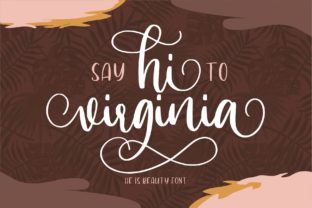
If you’ve ever scrolled through font libraries searching for something that feels human, expressive, and unmistakably memorable—Hi Virginia is likely the name that stopped you mid-scroll. It’s not just another script font. Hi Virginia is a bold handwritten typeface designed with confident strokes, subtle texture, and a stunning sense of rhythm. Whether you’re crafting a boutique logo, designing an Instagram story, or laying out a wedding invitation, this font brings warmth and presence without sacrificing clarity or impact.
Why Designers Reach for Hi Virginia—And Why It Often Gets Misused
People choose Hi Virginia because it solves a real problem: how to stand out in a sea of over-polished, AI-generated, or overly generic fonts. Its charm lies in its authenticity—it looks drawn by hand, yet it’s carefully engineered for readability at multiple sizes. But here’s where things go sideways: many users treat Hi Virginia like a drop-in replacement for any heading, without considering context, hierarchy, or technical constraints.
For example, one freelance designer used Hi Virginia for all body text in a client’s e-commerce site—thinking “more personality = better engagement.” The result? Customers struggled to scan product descriptions, bounce rates climbed, and the brand felt unintentionally chaotic. Hi Virginia excels in short-form, high-impact uses—not long paragraphs or tiny UI labels.
1. Ignoring Licensing Before Downloading or Sharing
Hi Virginia is available under several licenses—including free personal use, paid commercial, and extended web/app licenses. Yet it’s common to see designers grab a “free download” from an unverified site, assume it’s safe for client work, and embed it in a live website. That often leads to copyright notices, takedown requests, or unexpected fees later.
Better approach: Always go directly to the official source or trusted platforms like Creative Market or Adobe Fonts. Check the license details *before* pasting into a mockup—even if it’s just for internal review. If your project involves selling merchandise, embedding in software, or using on social ads, confirm the license covers those specific uses.
2. Overlooking Pairing and Contrast
Because Hi Virginia has such strong character, it can easily overwhelm supporting fonts. We’ve seen dozens of portfolios where Hi Virginia headlines clash with thin sans-serifs or overly decorative secondary fonts—creating visual tension instead of harmony.
Better approach: Pair Hi Virginia with clean, neutral typefaces that offer breathing room—not competition. Try it with modest sans-serifs like Inter, Lato, or even system fonts like Segoe UI. Use Hi Virginia only for primary headings (H1s, hero banners, logos), then switch to a highly legible font for subheads and body copy. Test contrast in real conditions: view your layout on mobile, zoom out to 50%, and ask: “Is the message still clear—or just noisy?”
3. Assuming It Works Equally Well Across All Formats
Hi Virginia shines in print and static digital assets—but doesn’t always translate smoothly to dynamic environments. Some users try to animate individual letters or apply heavy distortion effects, only to discover kerning breaks, stroke overlaps, or inconsistent spacing. Others assume variable font features are built in (they’re not—Hi Virginia is a standard OTF/TTF).
Better approach: Stick to intentional, minimal treatments. If you need animation, animate the entire word—not individual glyphs. For responsive websites, serve Hi Virginia as a display font only, and use web-safe fallbacks for smaller breakpoints. And never convert Hi Virginia to outlines unless absolutely necessary—you’ll lose hinting and scalability.
What to Check Before You Commit—Whether You’re Buying or Borrowing
Before adding Hi Virginia to your toolkit—or recommending it to a client—ask yourself these practical questions:
- Is the weight consistent? Some versions include only one weight (Bold). If you need light, medium, or italic variants for hierarchy, verify availability upfront.
- Does it support your language needs? Hi Virginia includes Latin-based characters and common punctuation, but may lack extended diacritics (e.g., Vietnamese tone marks or Cyrillic). Test with your actual copy—not placeholder text.
- How does it render at small sizes? Try setting it at 16px or smaller in your design tool. If letterforms start to blur or lose distinction, reserve it for larger applications only.
- Are you using it to compensate for weak content? A stunning font won’t fix vague messaging or poor layout structure. Use Hi Virginia to amplify strong ideas—not mask weak ones.
Real Projects, Real Results
A small bakery owner used Hi Virginia only for their chalkboard-style menu headers—paired with a simple serif for prices and ingredients. The result felt handmade and inviting, without sacrificing scannability. Meanwhile, an educator building an online course avoided Hi Virginia in slide decks but used it sparingly in chapter title slides and certificate designs—adding memorability where it mattered most.
In both cases, success came not from using Hi Virginia more—but from using it with intention. It wasn’t the star of every frame; it was the punctuation mark that gave emphasis where emphasis was earned.
Final Thought: Let Hi Virginia Serve Your Goals—Not the Other Way Around
Hi Virginia isn’t magic. It’s a well-crafted tool—one that rewards thoughtful application and punishes hasty assumptions. You don’t need to master calligraphy or own expensive software to use it well. You do need to pause before dropping it in, ask who will see it and how, and consider whether it makes communication easier—or just louder.
If you’re evaluating fonts for a new project, give Hi Virginia a fair test: set your actual headline, try two different pairings, check it on the device your audience actually uses, and walk away for ten minutes. Come back and ask: “Does this help people understand—or just notice?” That’s how you move from decoration to design.