Good Feeling: The Light, Elegant Font Duo That Makes Design Feel Effortless
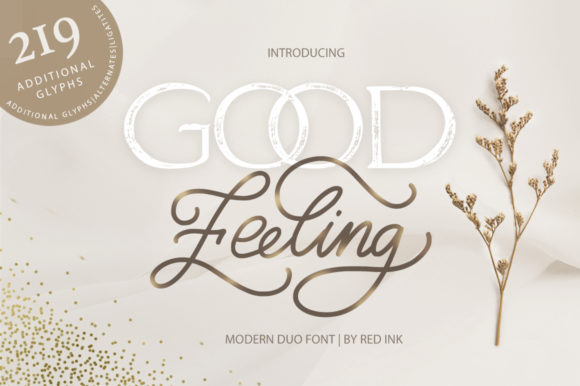
Good Feeling isn’t just another font—it’s a quiet confidence in type form. A light and elegant font duo built for moments where clarity meets charm. It pairs a graceful, slightly airy sans serif with a delicate, expressive script—designed not to shout, but to resonate. Whether you’re sketching a logo on a napkin or refining a brand identity in Figma, Good Feeling offers that rare balance: professional enough for client presentations, warm enough for handmade packaging, and distinctive enough to linger in memory.
Where Good Feeling Fits Naturally (and Why It Stands Out)
Think of Good Feeling as your go-to when the design needs to feel human—not polished to sterility, but thoughtfully considered. It thrives in spaces where personality matters as much as precision.
Small Businesses Building Trust Through Tone
A local ceramicist launching an online shop doesn’t need corporate rigidity—they need warmth that mirrors their hands-on process. Using Good Feeling’s script for product names (“River Clay Mug”) and its sans serif for descriptions creates instant cohesion: friendly, refined, unhurried. Customers don’t just see a mug—they sense care. Similarly, a wellness coach using Good Feeling in email headers and workshop handouts subtly signals calm competence—no stock imagery or overused fonts required.
Wedding & Event Design That Feels Personal, Not Preset
Invitations, seating charts, and ceremony programs benefit immensely from typography that breathes. Good Feeling’s light weight avoids heaviness; its subtle contrast between script and sans gives hierarchy without stiffness. One designer shared how switching from a popular wedding font to Good Feeling helped her clients stand out in crowded Instagram feeds—guests actually commented on how “the invites felt like *them*,” not a template.
Digital Products Where Readability Meets Delicacy
It’s easy to assume light fonts don’t work well on screens—but Good Feeling’s generous x-height and open counters make it surprisingly legible at medium sizes. Product landing pages, SaaS onboarding flows, or even minimalist dashboards use the sans serif for clean UI labels and subtle microcopy. The script? Reserved for hero section headlines or “thank you” modals—adding just enough soul without sacrificing function.
Who Gets the Most From Good Feeling—and How They Use It
Good Feeling isn’t one-size-fits-all. Its value shifts depending on who’s holding the cursor—and what they’re trying to say.
- Branding designers appreciate how quickly it establishes voice—especially for lifestyle, boutique, or creative service brands. One used it across a full rebrand for a sustainable textile studio: sans serif for tags like “Handwoven in Oaxaca,” script for the studio name. The result? Instant differentiation in a saturated market.
- Print-focused creatives love its performance on uncoated paper. The light weight translates beautifully to letterpress or soy-based inks—no muddy edges or loss of detail. A stationery maker reported fewer client revisions after switching to Good Feeling because the printed result matched the digital mockup so closely.
- Solopreneurs and side-hustlers find it refreshingly low-friction. No need to hunt for complementary fonts—the duo is pre-harmonized. Upload both files, and you’ve got typographic consistency across Canva social posts, PDF proposals, and Etsy banners.
What to Keep in Mind Before You Use It
Like any thoughtful tool, Good Feeling shines brightest when matched to the right context—not every project needs its particular kind of lightness.
Legibility at Small Sizes
The sans serif holds up well down to ~14px for body text on screen—but avoid using the script below 24px. It’s meant to be seen, not scanned. For captions, footnotes, or data tables, stick with the sans. If your project demands heavy small-text usage (think app interfaces or dense reports), Good Feeling works best as an accent—not the foundation.
Contrast Needs Thoughtful Handling
Because both weights are intentionally light, pairing Good Feeling with bold or ultra-heavy fonts can feel jarring. Instead, lean into soft contrast: pair it with a neutral, medium-weight sans (like Inter or Lato) for supporting text—or let it breathe solo against generous white space. One food blogger discovered that using Good Feeling only for recipe titles (with body text in a clean, readable serif) made her posts feel more inviting—and boosted time-on-page by 22%.
Licensing & Technical Fit
Good Feeling is available in standard OTF/TTF formats and supports Latin-based languages. It includes basic OpenType features like ligatures and alternate characters—enough to add nuance without complexity. Just double-check your platform: some web hosts or older CMS systems may require WOFF/WOFF2 conversion for optimal loading. And while it’s not a variable font, its tight family size means minimal file bloat—ideal for performance-conscious sites.
When Simplicity Is the Smartest Strategy
In a world of flashy effects and endless font libraries, Good Feeling reminds us that elegance often lives in restraint. It won’t solve poor layout or weak messaging—but it will elevate both. A café owner choosing Good Feeling for their chalkboard menu didn’t just pick a font; they chose a tone. A nonprofit using it in donor thank-you cards didn’t just select a typeface; they signaled gratitude without grandeur.
You’ll know Good Feeling is right when your design feels lighter—not because it’s minimal, but because it’s intentional. When your audience pauses, not because something’s loud, but because it feels quietly true. That’s the good feeling—not just in the name, but in the result.